

Webhook Console
Webhooks can be managed in the Webhook Console. Here, you can:- Register new webhooks
- Manage your current webhooks
- See the webhook documentation
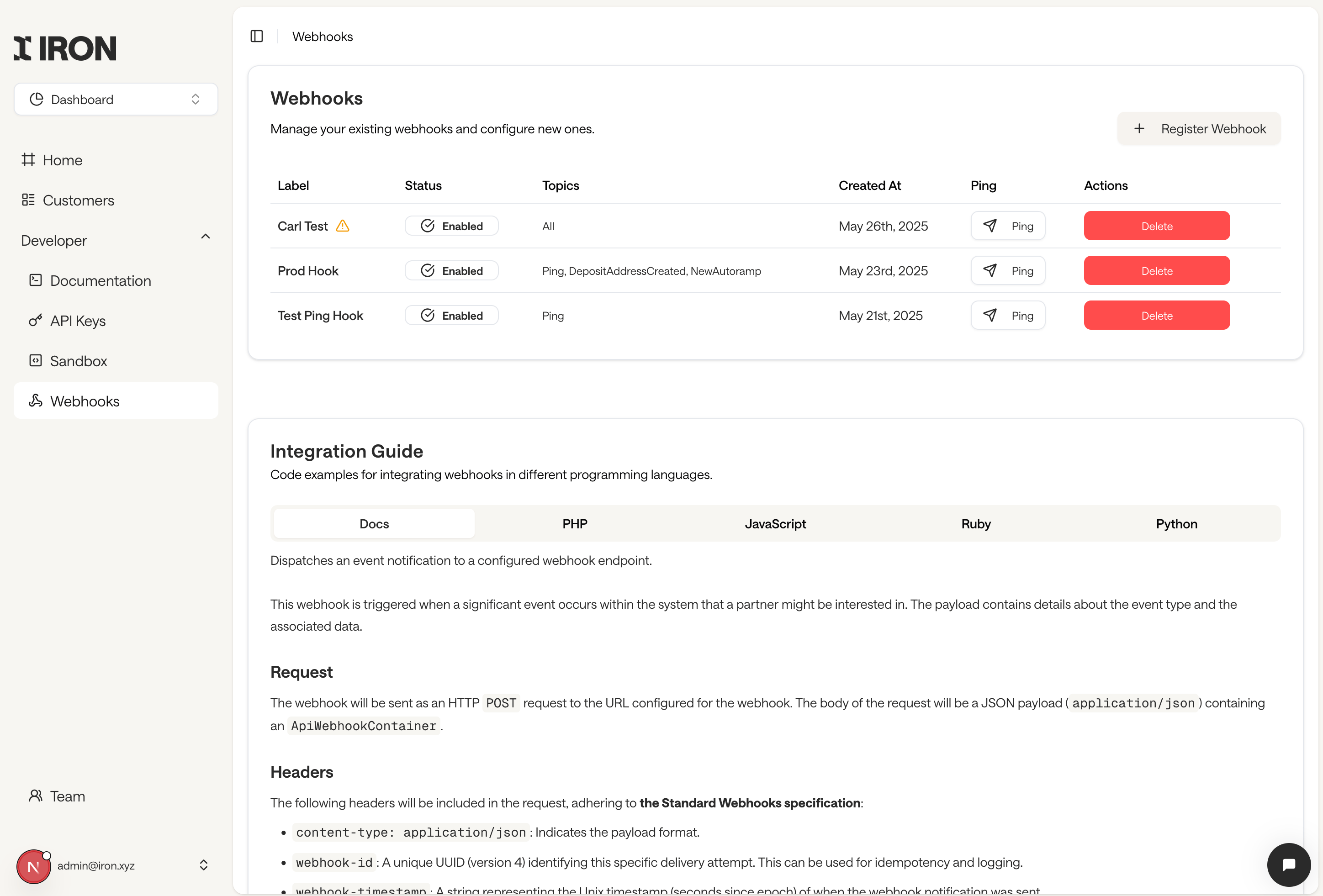
The Webhook Console
Fields
- Label: The name of your webhook. If your webhook caused an error or did not respond, you will see a danger icon next to the name. If you hover over it, you will see more information
- Status: Whether your webhook is enabled
- Topics: Webhooks can register for different topics
- Ping: After creating a webhook, you can press this button to force sending an event to the webhook in order to trigger it
Register Webhook
Webhooks can be registered in the Partner Area. Click the Webhook navigation entry, and then the “Register Webhook” button.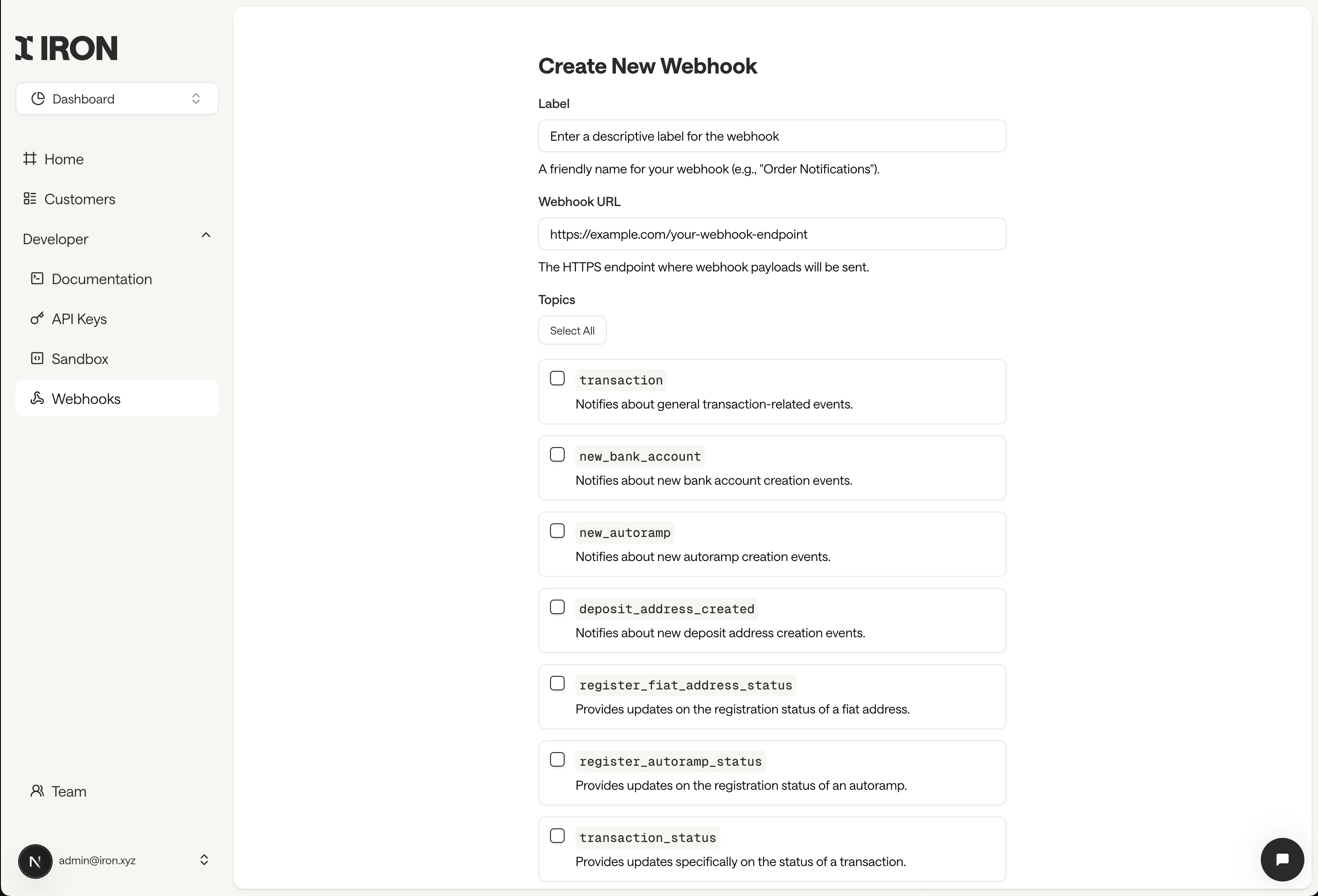
https:// URL that points to where you want the webhook to go. You can select which topics you’re interested in for the webhook
Once you created the webhook, you will be provided the webhook secret in the next screen. This is needed to validate the webhook signature.
Implement Webhooks
The Partner Area webhook console provides sample code for webhook signature validation. However, additional information can be found below. Overview- Webhook ID: newEvent
- Method: POST
- Content Type: application/json
- Authentication: HMAC-SHA256 signature (via headers)
- Trigger: Emitted when a relevant customer or platform event occurs
Receiving Webhook Requests
Iron will send webhook notifications to the endpoint URL you’ve registered during integration setup. Each request includes headers for verification, and a JSON body describing the event.HTTP Headers
Iron follows the Standard Webhooks specification: Headers content-type: Always set to application/json. webhook-id: Unique UUID (v4) of the delivery attempt. Use this for logging and idempotency. webhook-timestamp: Unix timestamp (in seconds) indicating when the webhook was sent. webhook-signature : Signature used to verify request authenticity. Format:v1=\<HMAC\_SHA256>
Signature Verification
To ensure webhook authenticity, verify the signature using your secret key:1
Extract the
webhook-timestamp and webhook-signature from the headers.2
Remove the
v1= prefix from the signature.3
Concatenate
webhook-timestamp + raw_body (no whitespace or formatting).4
Compute the HMAC-SHA256 digest using your webhook secret key.
5
Use constant-time comparison to check if the computed digest matches the signature.
Webhook Payload
Webhook requests include a top-levelWebhookContainer object. The message field varies depending on the event type.
Example Payloads
Below, you can find example payloads for all possible events that the webhooks payload can deliver.Payload Schema
WebhookContainer (object)
WebhookNotification (inside data)
Supported Event Types
Each message object follows a typed schema depending on the type of event.- WebhookEventMessage
- WebhookFiatAddressStatusMessage
- WebhookAutorampStatusMessage
- WebhookTransactionStatusMessage
The
status field is deprecated. Use transaction_status instead for the current transaction state.The transaction_hash field is only present when the payout destination is a blockchain address (crypto payouts).- WebhookCustomerStatusMessage
- WebhookPingMessage
- WebhookIdentificationStatusMessage
Pending → Customer has not started the process, or a business submission is waiting on missing items (resume url on the identification)
Processed → Customer has completed the input process
PendingReview → Identification is ready for review by Compliance Team
Approved → Identification has been approved by Compliance Team
Declined → Identification has been declined by Compliance Team
Expired → The identification process was not completed and has been expired
Response
Your webhook endpoint must return:HTTP/1.1 200 OK
Return 200 to acknowledge successful receipt. Any other status code may cause the webhook to be retried.
We recommend logging all webhook-id and response statuses for audit and troubleshooting purposes.
Error Handling & Retries
- If your service remains unavailable, Iron may pause webhook delivery.
- Retry attempts include the same webhook-id for deduplication.
- Webhooks that fail (non-2xx status or timeout) will be retried with exponential backoff.
- You can see failing webhooks in the Partner Area